
Midland County Traffic Warrants Explained
A missed court date creates a warrant problem fast. The City of Midland asks a person to appear within 14 calendar days, and skipping that step can bring a failure-to-appear charge plus a warrant. County JP traffic matters run under their own courts and written appearance requirements. So the issuing court decides where you search. A city ticket belongs to Midland Municipal Court. A county Class C citation belongs to one of the four JP precinct courts. Midland County drivers also run into DPS license-renewal holds, but that state report is separate and replaces neither court's record. Match the ticket to the Midland County court before anything else.
Midland County Traffic Court Routes
One search does not cover every Midland-area ticket. The court named on the citation controls which record you need. Midland Municipal Court takes city traffic, parking, and other city Class C matters. JP1 through JP4 handle county Class C and criminal traffic cases, each with its own clerk number and payment link. For a Midland County warrant, Warrant Services at 432-688-4700 serves active arrest warrants issued by the JP Courts and County Courts. That office is not a citation record. Ask the issuing court which channel fits. The JP1 page, JP2 page, JP3 page, and JP4 page list each court's scope and contact information.
Checking for a Traffic Warrant
Start with the citation number and the court name. No JP page publishes a single countywide Midland County traffic-warrant roster.
- Use the court named on the citation: Midland Municipal Court or the correct JP precinct.
- For a city citation, choose one of the six municipal search tabs and enter each required field as displayed.
- For a JP ticket, open that precinct's official page for its payment link, form, email, or clerk contact.
- Call the issuing court if no result appears, the portal is delayed, or the matter may involve a warrant; ask about an in-person or written appearance rule.
- For a reported license hold, check the DPS FTA/FTP channel and contact every court listed as a reporting court.
If your question is a Midland County Court or JP warrant rather than a citation, use the county Warrant Services page. Confirm its scope first.
Midland County Traffic Warrant Search: Six Modes
The city's citation tool opens with six tabs. You can look up a case by citation number and birth date, by driver's-license number with state and birth date, by Social Security number and birth date, by license plate with state, by first and last name with birth date, or by business name. Match your entries to the examples. No registration is needed. Use the official municipal citation search for your own city case. The JP side runs on a separate vendor. See the JP traffic payment page, whose landing screen offers a court-specific payment route rather than a countywide list of Midland County traffic warrants.
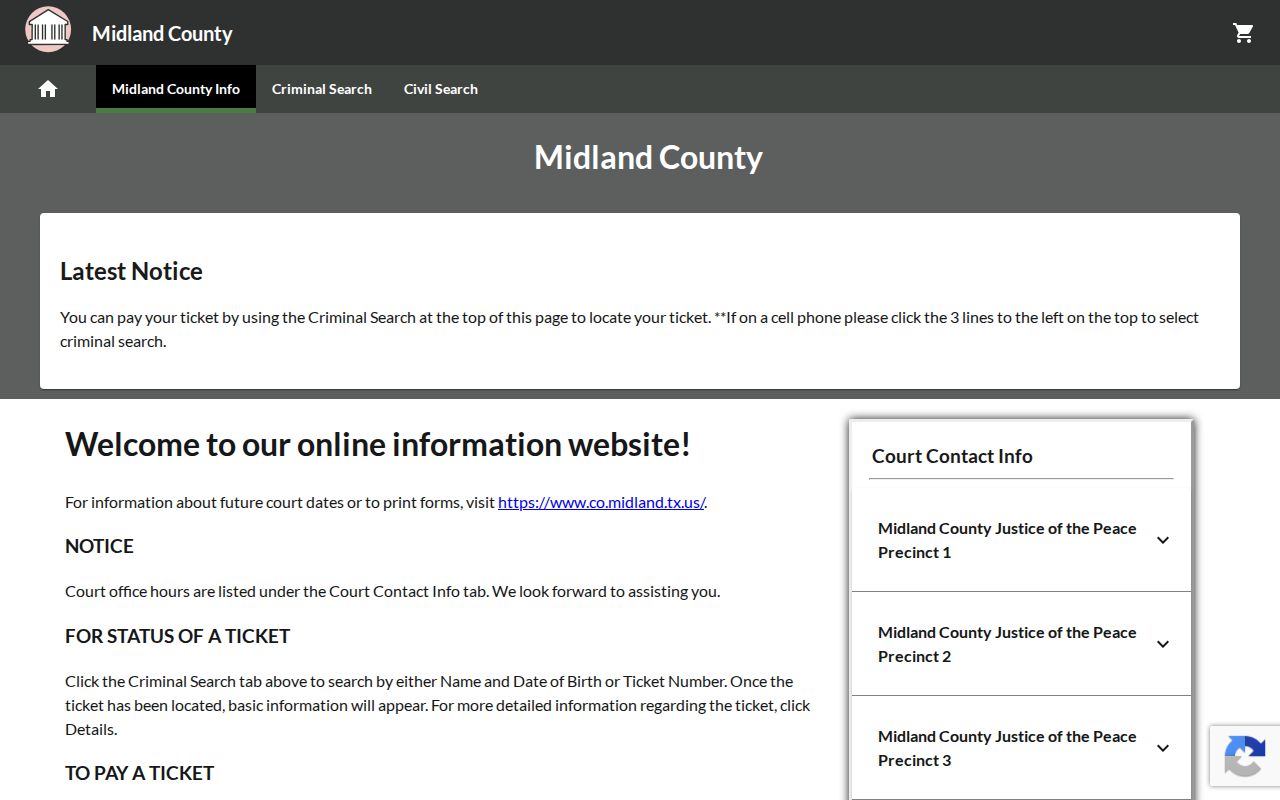
For Midland County JP payments, follow the link on your issuing precinct's own page, since the payment vendors differ by court.
Inside a Traffic Warrant Record
No single record layout spans the city portal, the JP payment pages, and county Warrant Services. These fields help sort a ticket inquiry. No one interface exposes every Midland County warrant or court status.
| Citation or cause number | Number on the citation identifies the actual ticket or case; no sample number is shown. |
|---|---|
| Issuing court | Midland Municipal Court or the specific JP precinct. |
| Identity fields | The city portal asks for different combinations of name, date of birth, driver license, SSN, plate, state, or business name. |
| FTA status | A court appearance issue is separate from a DPS license-renewal report. |
| Payment state | A transaction sent or mailed may not yet be received and posted. |
Midland County courts use their own labels. One number accepted in a portal does not reveal the ticket, warrant, or FTA behind it.
Midland County JP2/4 Appearance Rule
The JP2/4 information letter sets one clear rule. Class C traffic and violation matters in these Midland County courts require an appearance in person, in writing, or through an attorney by the date listed. A phone call does not count. The plea packet also warns that a missed setting may result in an arrest warrant. Read the court paper first. JP2 lists 432-688-4722 and jp2criminal@mcounty.com, while JP4 lists 432-688-4724 and jp24clerks@co.midland.tx.us. Call to confirm the current counter address, since county pages show conflicting locations. Do not rely on a call alone to meet a written Midland County court deadline.
Midland County Traffic Warrant Payment Steps
Ask the issuing court for the current amount and the accepted way to resolve the case. City and JP procedures differ across Midland County. The city allows eligible online, in-person, and mail payments, while each JP precinct points to its own payment tool. Some JP matters still require an appearance.
- Confirm the court, case number, amount due, and whether an appearance is required.
- Use only a payment link reached from that court's official page.
- If the case is contested or needs a hearing, ask the court what filing or appearance is accepted; consult counsel as needed.
- Save the receipt and ask when the payment or court action will be posted to the case.
Warning: A mailed city payment may leave the warrant active until it is received and posted. Confirm the case status with the issuing court after any payment.
For city credit or debit card payments, the official My Ticket page lists a 2.5% convenience fee. A Midland County JP court may differ.
Midland County JP3 2025 Roundup Terms
JP3's page carries Warrant Round-up artwork. A QR-code payment flyer appears there too. Neither image states current dates, eligibility, fee waivers, or amnesty terms. So the artwork is no promise that a Midland County warrant is waived or that every JP case qualifies. Call JP3 at 432-688-4723 with questions. Its official precinct page shows whether a current program applies to a specific case. That page also links to Texas Online Records for criminal traffic payment. Navigate from the government page instead of scanning a QR image. Midland County posts no countywide traffic-warrant count or public roster.
Traffic Warrants, FTA, and License Holds
In Midland County, three records can flow from one missed court date, and they are not the same thing. A court can enter a failure to appear and issue a warrant. Separately, DPS may deny a license renewal once a court reports a qualifying failure to appear or an unpaid judgment. Each record lives in its own system, so clear one and the others may still stand.
| Record or program | What starts it | What it answers |
|---|---|---|
| Traffic warrant | Court action after an unresolved ticket or missed date | Ask the issuing court about the order. |
| FTA | Missed court appearance | Ask the court about the case and required appearance. |
| DPS FTA/FTP | Qualifying court report | License-renewal hold information, not a full warrant check. |
The DPS program page gives the OmniBase number as 1-800-686-0570. Updates can take several business days, so confirm timing with every reporting Midland County court.
Midland County Payment Kiosk Limits
The county's official money-deposit information describes payment locations and their processing fees. That covers county money deposits, not necessarily every traffic citation or municipal warrant. Ask the issuing Midland County court before paying a traffic case at a kiosk. The hardware shown is simply where deposits happen, not a warrant-payment option for all cases.
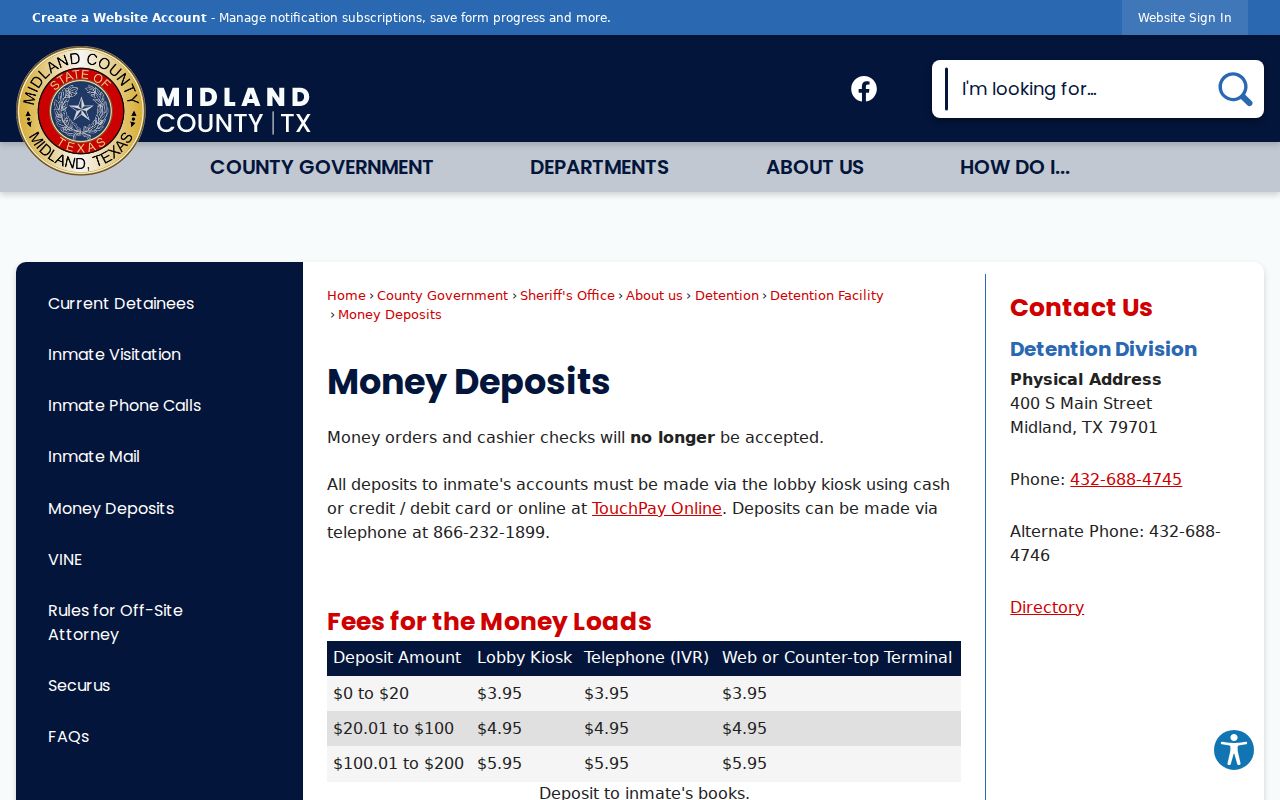
Keep your receipt, then confirm the record with the Midland County JP or city court that issued the ticket.